By Darrell Martin
Canada releases two different reports regarding employment. There is the Employment Change, released right after the month ends, having impact as it is the actual change in the number of employed people during the previous month. Traders watch this one due to its influence on consumer spending. The other report is the Unemployment Rate, which is considered more a lagging indicator.
Statistics Canada will release the two reports, Friday, April 8, 2016, at 8:30 AM ET. Together they get the market moving. Based on previous market reaction to these news reports, an Iron Condor using Nadex spreads, going for a $35 or more profit potential, is a high probability trade opportunity.
Nadex spreads are day trader options and have defined capped risk. You know your max risk upfront. There is no winning past a spread’s floor or ceiling, which designates the range of the market you can trade long or short. For this setup, buy a Nadex USD/CAD spread with the ceiling being where the market is trading at the time, and sell a Nadex USD/CAD spread with the floor being where the market is trading at the time. You will want to have a chart up of USD/CAD to see where the underlying market is.
Keep Your Risk Realistic To a 1:1 Risk Reward Ratio
Entry can be as early as 7:00 AM ET for 9:00 AM ET expirations. To manage the max risk and keep it realistic, put limit stop orders at the max risk/reward points where the market could hit 70 pips up or down. Since you bought below the market and sold above the market, there are a number of moves where you can profit. The market can make a move and one side of your Iron Condor can profit. Leave the other side on though, as the market pulls back, the other side may profit as well. The market can also stay in a range somewhere between your breakeven points at expiration and you will make some profit. The breakeven points, depending on your exact entries, are where the market could hit 35 pips up or down. If the market goes back to center between the two spreads and is there at expiration, you make max profit.
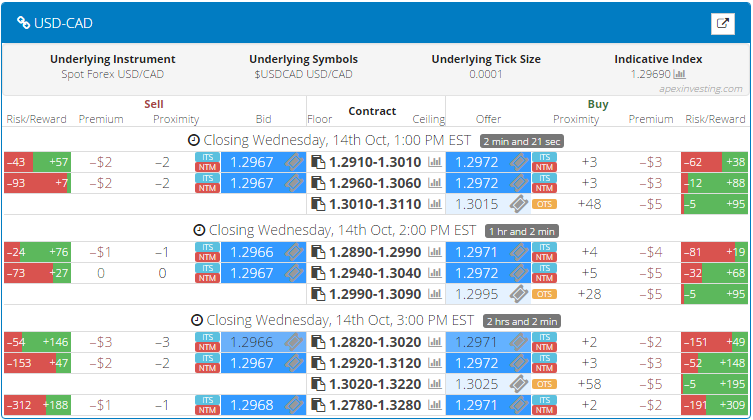
The spread scanner designed by traders for traders to learn how to trade Nadex spreads and trade them easily, is the tool to use and easily find your spreads. Day traders have free access to it and at a glance in one window can see all the necessary information to make their trade choices. Choose your market, find the right ceiling and floor parameters and profit potential minimums. Click the ticket icon and verify your order info and then click submit. You need to be logged into a demo or live Nadex account as well, which can be set up in minutes. Nadex is a US based CFTC regulated exchange and can be traded from 48 different countries. You can set up limit take profit and stop orders or exit at any time from your trade. See below for an example of the spread scanner.
For a complete calendar of news events to trade, along with strategies and access to the free spread scanner, just visit www.apexinvesting.com.
